Skip to content
Sign up free

Take a look inside your opponent book.

Follow the journal from an opponent profile to a match, a training session and an export. Paid features are identified beside their examples.

Screens show fictional demo records.
Screen by screen
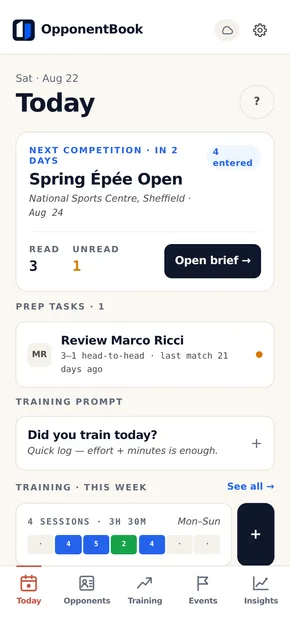
The Today screen in OpponentBook: a countdown to the next competition and tasks for checking notes about the opponents you know.
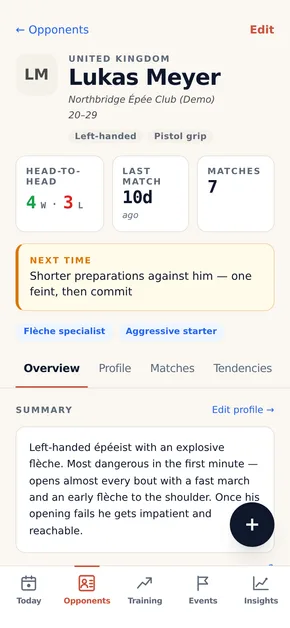
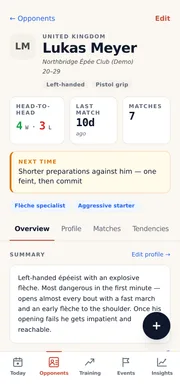
An opponent profile in OpponentBook: head-to-head record, style tags, and the note to reread next time.

The signature feature

Where does your opponent score on you?

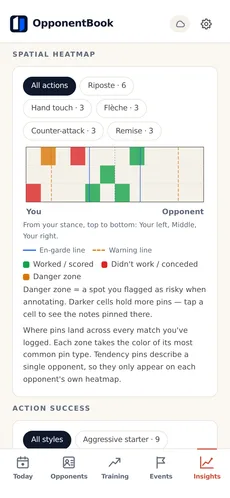
Mark where a situation happened and add a short note. Attach a video file to the match and a pin can mark the second it happened as well as the place. Premium heatmaps collect pins from your recorded matches. Some sports also let you record a named position separately from a location on the diagram.
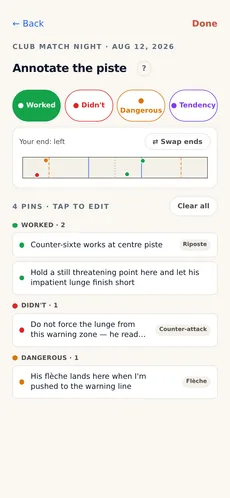
  • Four pin kinds — worked, didn't work, danger, tendency
  • A drawing for all 17 sports, with separate position lists where relevant
  • Link a pin to the exact second in an attached video file, and reopen it at that moment later
  • Opponent and aggregate heatmaps with Premium; tendency pins appear only on the opponent heatmap
The annotation screen: a fencing piste schematic with pins grouped by kind, each with a short note.
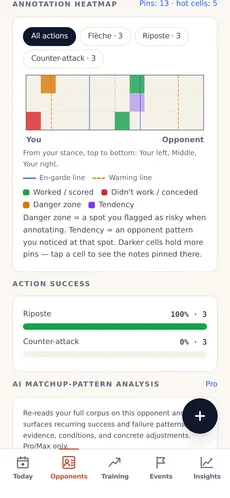
An opponent's annotation heatmap: piste zones shaded by where actions worked, failed or turned dangerous, with an action-success list below.

Screen by screen

What keeping the book actually looks like.

The same journal on phone, tablet and laptop. Everything here is on the Free tier unless a paid tier is marked.

01

A living profile for everyone you face

Keep your head-to-head record, handedness, grip and style tags alongside your own observations. Use the Next time note for a reminder you can find just before facing that opponent again.
  • Search and filter the whole book by name, club or style tag
  • Keep observations together with the matches and notes they refer to
  • The Next time note is easy to find before you compete
  • Add your own style tags and profile options, and hide the built-in ones you never use
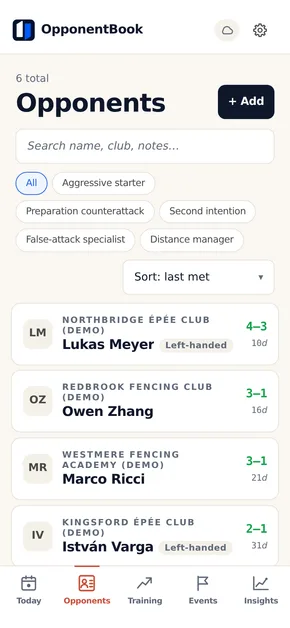
The opponents list: profiles with club, head-to-head record and style tags, filterable by tag.
02

Log a match in three lines

Start with the score, then note what worked, what didn't and what to try next time. Keep it brief while you can still describe the action. The opponent's profile brings those matches and reflections together for later reading.
  • Sport-aware scoring — by period, sets or rounds, sudden death and golden score included
  • Keep pins and reflections with the match, and find them from the opponent’s page
  • Attach photos and video as you log the match, within your device and storage capacity
  • Link a pin to the exact second in an attached video file, and find it there again
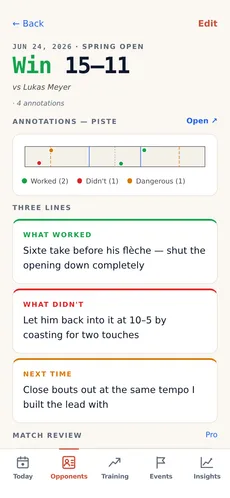
A match detail screen: the result and score, pinned moments on the piste, and the three reflection fields — what worked, what didn't, next time.
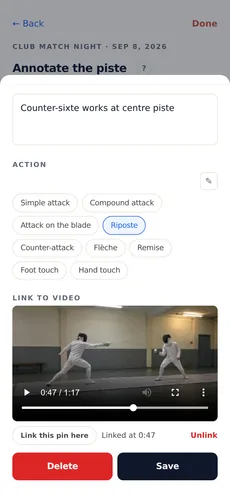
A pin’s note sheet on the annotation screen: a short note and an action tag above the video attached to that match, paused at the linked moment, with the controls for linking, unlinking and saving below it.
03

Preparation and results, event by event

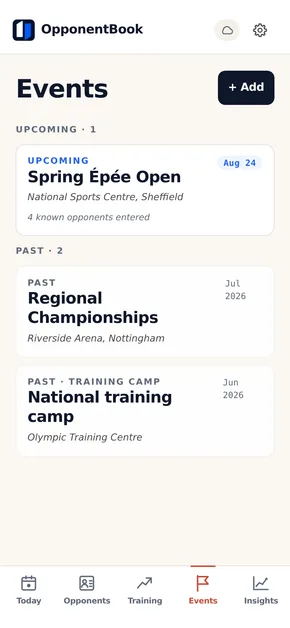
Create an event and add the opponents you expect to face. See which profiles you have opened, log matches on the day and revisit the results afterwards.
  • Review states per expected opponent — read and unread at a glance
  • Log training camps as events too
  • Find the day's matches under the event, even later in the season
The events list: the next competition with its date, venue and how many known opponents are entered, then past events including a training camp.
04

Training lives next to the book

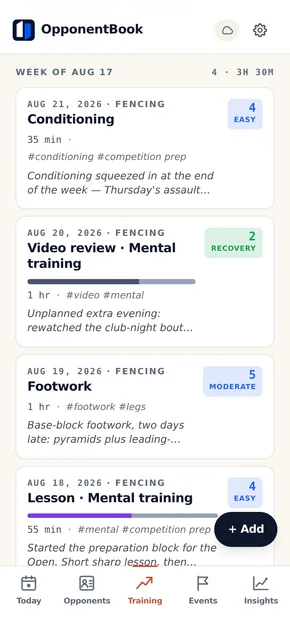
Record each session's category, duration, effort and notes. The free training journal sits alongside your opponent book, making it easier to bring specific training questions to your coach. On Pro, the evolution analysis can read it beside your match record when you ask.
  • A short entry can include the category, minutes, effort score and a few notes
  • Tags tie sessions to what you're preparing for — an opponent, a competition
  • See weekly totals for sessions and hours
  • Add your own training categories, and hide the ones you don’t use
The free training journal: logged sessions grouped by week, with categories, duration, effort scores, tags and notes.
05Premium

A coach's plan, compared honestly

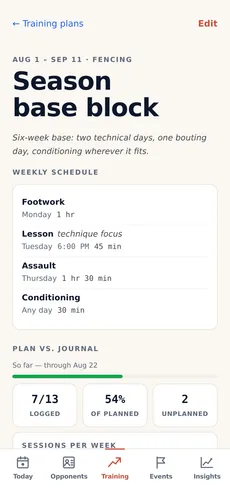
Premium adds weekly training plans and a comparison with the sessions you logged. Share a plan as a file that someone else can import as their own copy. Export dated sessions to a calendar when you want them in your schedule.
  • Compare the sessions you planned with those you recorded
  • Share the plan as a file — a coach writes one, the whole squad imports it
  • Calendar exports (.ics) are snapshots; export again after changing the plan
A Premium training plan: a weekly schedule and a comparison of planned and logged sessions.
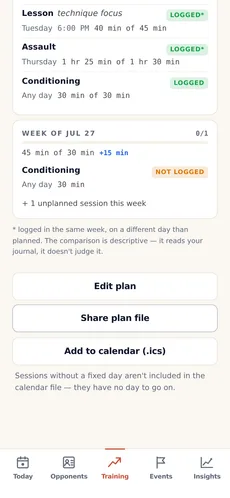
A training plan's actions: edit, share the plan as a file, and add the schedule to your calendar as .ics.
06Premium

Analytics about you, for you

Explore your recorded results by opponent style, monthly win rate, action-success rates and spatial heatmaps with Premium. These summaries use your own entries; they do not diagnose the causes of a result.
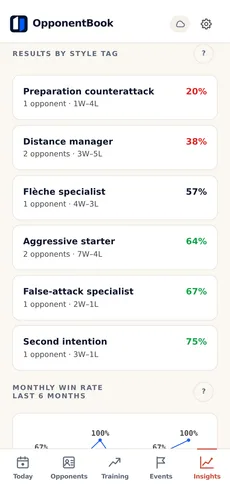
  • Compare your recorded results across opponent style tags
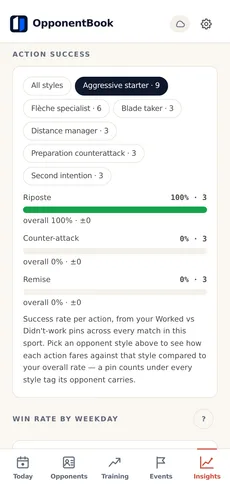
  • Action success can be split by opponent style — what works against whom
  • Every number is computed from your journal, on your device
Insights at Premium: the aggregate spatial heatmap across all logged matches, with zone legend.
Insights at Premium: results by opponent style tag and a monthly win-rate trend chart.
Action success at Premium: success rate per action, compared against one opponent style to show what works against whom.
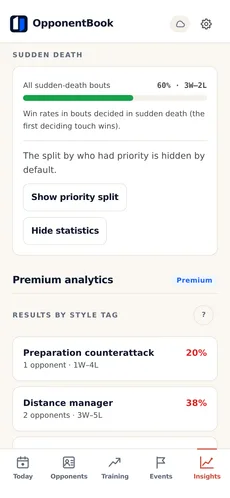
Sudden-death statistics: win rate across all sudden-death bouts, split by who held priority.
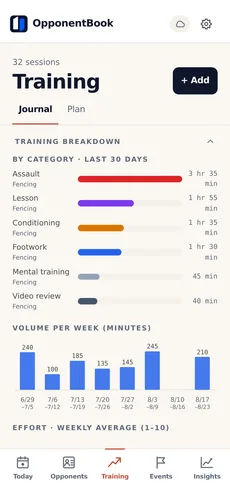
Training analytics at Premium: the last 30 days broken down by category, with weekly volume.
07

Take the book to your coach

Your notes do more when your coach can read them too. Export an opponent's profile, a period of training or the whole journal to PDF or Word, free at every scope. The files are formatted for the records you choose, from a scouting brief to a training report.
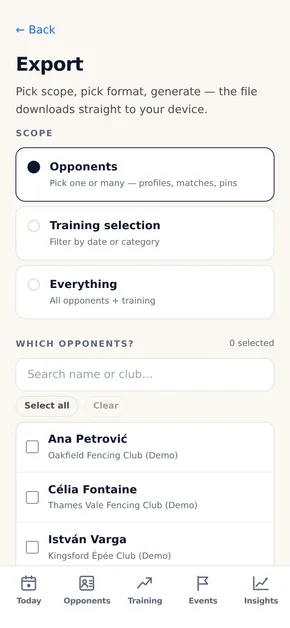
  • Pick the scope — one opponent, many, training by date range, or everything
  • On Premium, the training report includes the plan-vs-journal comparison
  • PDF for reading, Word for coaches who annotate
The export screen: choose opponents, a training selection or everything, then generate a PDF or Word file.

Android, web, every screen

One journal, on every screen.

Use the same journal in the Android app and on the web by connecting the same storage account. Android supports Google Drive and Dropbox; iCloud is available in the web app. Sign-in and payment options also differ between platforms. Log a match on your phone and reread it on a larger screen.

  • Log on your phone between matches; type up the longer notes at a keyboard
  • Journal sync uses your own connected storage
  • Read downloaded records and write notes offline; reconnect for sync and AI
Get it on Google Play

On iPhone and iPad, the web app works in Safari for now — a native app is in the works.
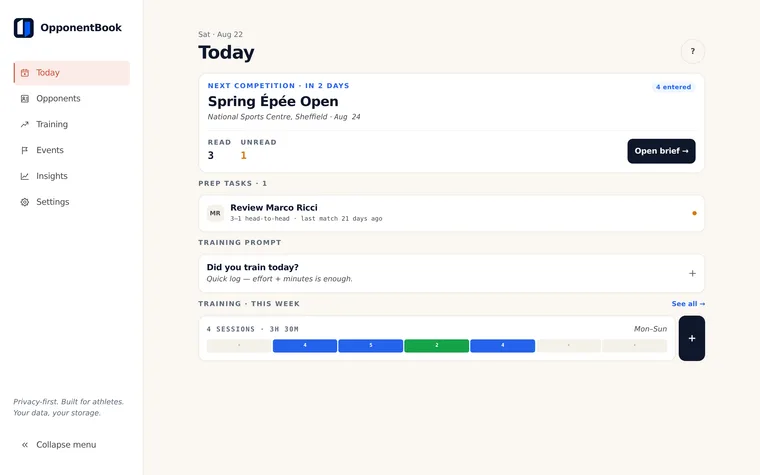
app.opponentbook.com
The Today dashboard open in the browser on a laptop: the next competition with a countdown, prep tasks per known opponent, and the week's training.

Your storage, your records

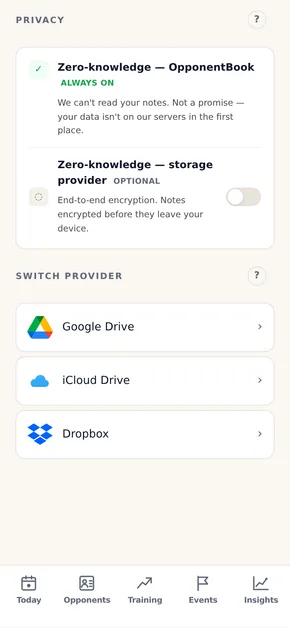
We do not keep a server copy of your journal.

Your journal stays on your device and connected storage. OpponentBook keeps account, subscription and usage information, plus a minimal index and settings. Requested AI actions send the relevant content for processing; this is separate from journal storage.

Journal content in your storage

  • Your observations about opponents
  • Match reflections and scores
  • Training entries
  • Photos, video
  • Whether you reviewed before a match

Service information we handle

  • Your email and login method
  • Your subscription tier
  • An index and settings, including IDs, dates and sport tags

Optional end-to-end encryption also protects journal records from your storage provider. Photos and video are outside this encryption.

How your data is handled →

When you want more than memory

AI that reads your book — only when you ask.

Request an opponent summary, competition brief or analysis of your notes. The content needed for that action passes through OpponentBook to an external AI provider. AI does not review your journal in the background.

Premium

One-tap opponent summaries

Bring the notes about one opponent into a short summary to check before you compete.

Pro

Pre-competition briefs

Create a competition brief from your notes about the opponents you expect to face.

Pro

Patterns across your book

Explore AI suggestions about opponent styles, recurring problems and changes in your game. Tick a box and the evolution analysis also reads your training journal: it quotes your own notes, sets your training beside your results against each opponent style, and offers one thing to try. It states a gap, never a cause.

Examples of saved analyses.

Illustrative results using fictional journal entries. Check an AI suggestion against your records before using it.
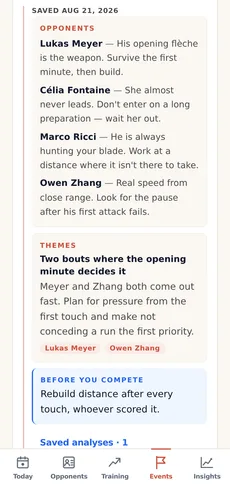
A saved AI competition brief on an event: one tactical line per expected opponent, a shared theme, and a reminder before you compete.
Competition briefPro
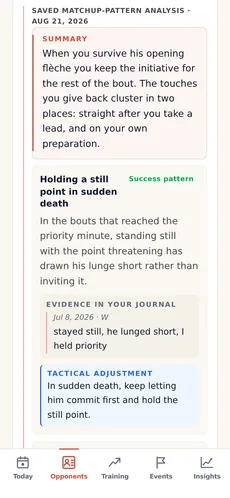
A saved AI matchup-pattern analysis for one opponent: a summary, then a success pattern citing the journal entry it comes from and the tactical adjustment it suggests.
Matchup patternsPro
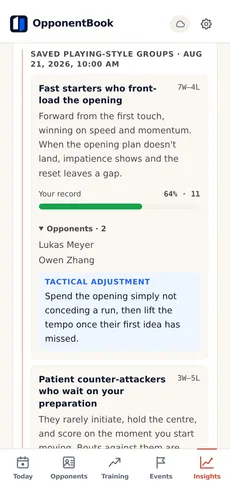
A saved AI playing-style classification: named groups of opponents who play alike, each with how that style plays, your W–L record and win rate against the group, the opponents in it, and a tactical adjustment.
Playing-style classificationPro
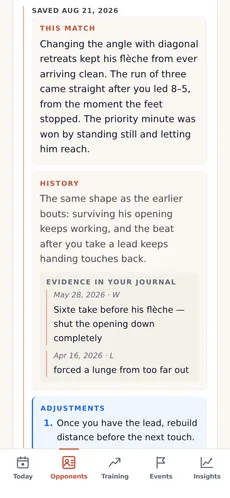
A saved AI match review: suggested turning points, a comparison with earlier bouts and proposed adjustments.
Match reviewPro
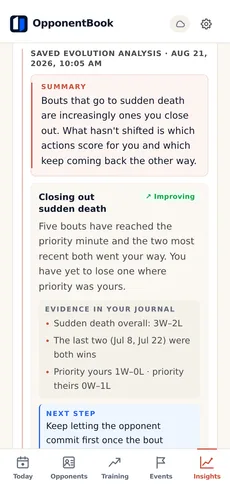
A saved AI evolution analysis: a summary, then a pattern marked improving, with the journal evidence behind it and a concrete next step.
Season evolutionPro
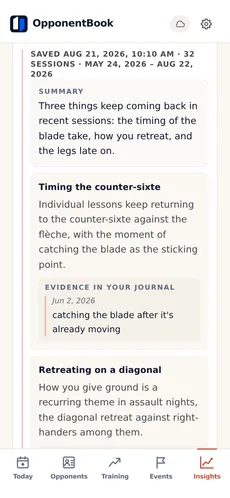
A saved AI training-theme summary: recurring themes across recent sessions, each quoting the journal entry it comes from.
Training themesPro
Compare all tiers →

AI results you save stay in your storage, even if you cancel a paid plan.